Showing posts with label Exchange 2003. Show all posts

Thursday, August 25, 2011

Errors when using vbscript to retrieve mailbox size information

One of my colleague was having problem running a vbscript which uses the WMI root\microsoftexchangev2 namespace and Exchange_Mailbox class to generate a mailbox size report for all the mailboxes on an Exchange 2003 server.

The script will create a log file to log the activities and a text file to store the result.  At first she double clicked on the vbs file to execute the script in the Exchange server itself.  So the script get handled by the Windows-based script host (Wscript.exe).  She waited for more than 10 minutes but the log file and text file remains empty except for some headers.  So she double clicked on the vbs file again to retry and this time she received an error message (Code: 800A0046).

image

This error was quite misleading and she thought that she lacked some permissions to connect to the Exchange server.  However, it was actually the locking of the log and text files that was causing the error 800A0046.  The first execution of the script which is handled by wscript.exe encountered an error but thanks to the “On Error Resume Next”, it went into an infinite loop causing the log and text files to be locked.  Checking the Windows Task Manager revealed that wscript.exe is still running.

image

I terminated the wscript.exe process and comment out the “On Error Resume Next” line.  I advised her to re-run the script using command-based script host (CScript.exe).  Re-run of the script showed a different error with an error code of 0x80041013.

image

Reviewing the script showed that it failed to create an instant of the Exchange_Mailbox class.  A quick check on the Exchange services, I noticed that the “Microsoft Exchange Management” service was stopped.

image

Starting the “Microsoft Exchange Management” service resolved the issue and she was able to generate the mailbox size report.

Wednesday, April 27, 2011

Remote Procedure Call (RPC) and Remote Procedure Call (RPC) Locator Services Not Running

I received an emergency call from my China colleague yesterday.  He said that his Exchange server is not working because all the Exchange services refused to start.  He said that it began when he tried to add a new mailbox but received a RPC error.  He thought that changing  the service account for the RPC and RPC Locator services to a domain account with administrative right on the server will solve his problem.   After the change, he rebooted the server and the RPC services failed to start.  This also caused all Exchange services to fail.  He tried to change back the service account but when he tried to open the properties of the services, the properties dialog box did not appear.

Since I have no way to remote to his server, I can only ask him to edit the registry to change back the service account.  The two registry keys are:

HKEY_LOCAL_MACHINE\SYSTEM\CurrentControlSet\services\RpcSs

HKEY_LOCAL_MACHINE\SYSTEM\CurrentControlSet\services\RpcLocator

He changed the value data for ObjectName from the domain account back to NT AUTHORITY\NetworkService.  Rebooted the server and lucky him that that solved his problems, including the issue on adding new mailbox.

Sunday, December 26, 2010

Backup Exec – Exchange 2003 Backup Failed With Error “0xe00002f7 - Cannot extract mailbox messages from the Exchange backup”

I received an SMS notifying me that my Exchange 2003 backup has failed. I logged on to the Symantec Backup Exec Server and checked on the error log. The following is the error log.

Job ended: Saturday, December 25, 2010 at 7:46:42 AM Completed status: Failed Final error: 0xe00002f7 - Cannot extract mailbox messages from the Exchange backup. Review the job log for more information. Final error category: Resource Errors

For additional information regarding this error refer to link V-79-57344-759

Backup- \\ExMail\Microsoft Information Store\Storage1
V-79-57344-759 - Unable to complete the operation for the selected resource using the specified options for the following reason: VFF Open Failure. This can be caused by low memory or disk resources.

Backup- \\ExMail\Microsoft Information Store\Storage2
V-79-57344-759 - Unable to complete the operation for the selected resource using the specified options for the following reason: VFF Open Failure. This can be caused by low memory or disk resources.

Following the link V-79-57344-759, Symantec suggested to re-install the remote agent and restart both the Exchange server and Backup Exec server. I didn’t follow the instruction thought. What I did is restart the Backup Exec remote agent and Exchange services. After that, I ran the backup job again and I just received an SMS that the backup is successful.

Tuesday, August 29, 2006

Exchange Database Corruption Again

Last Thursday night, the same Exchange Database gone "bad" again. However, this time round we are lucky enough to restart all databases without the need to restore. The next day, we contacted Microsoft PSS. After some diagnostic, the Microsoft Engineer suggested we move all mailboxes from the problematic database to a new database.

On Sunday, I created a new Mailbox Store and started moving all the 300 plus mailboxes. It took me almost 11 hours to finish all mailboxes (what a pain). After the move had completed, I deleted the problematic Mailbox Store and did a full backup. The full backup took much longer to run compare to other time but nevertheless, it did complete successfully.

Shall keep an eye on this and hopefully the corruption will not happen again.

Thursday, August 10, 2006

Disk Trespassing

After someone from the MS newsgroup suggested that outdated hardware firmware might be the cause of our Exchange 2003 Server database corruption, I did a check on our EMC CX300 SAN event log.

From the event log, I see some disk trespassing activities and it always happen on the same four disks. Two out of the four disks are used by our Exchange 2003 Server. I logged a case with out vendor and after sending them information collected from the SAN (spcollect) and Hosts (EMCReports), they finally get back to me. I was told that the hosts are causing the trespassing and the issues are.

1) The StorPort hotfix installed was outdated and will cause blue screen to the server. The recommended hotfix is 916048.
2) The PowerPath version (4.4.1.65) installed on the hosts will cause trespassing for every reboot. The recommended version is 4.4.1 eFix 2.

I have both the new hotfix and PowerPath ready and we planned to have them installed this weekend since we are also having some network upgrade. I hope this will solve the problem of trespassing if not the real cause of the database corruption.

Exchange 2003 Server Diaster

On 29th July 2006, we have a terrible disaster on our Exchange 2003 server. One of the databases in one of the storage group got corrupted and this was logged in the event log.

Source: ESE
Category: Database Corruption
Event ID: 447

Information Store (8872) SG1: A bad page link (error -338) has been detected in a B-Tree (ObjectId: 397, PgnoRoot: 7917) of database 'E:\Exchsrvr\SG1\MS4\MStore4.edb' (0 => 7917, 538976288).


This causes all others stores within the same storage goup not able to mount/start. If I try to mount them, it will fail and this is logged in the event log. I thought that a courrupted database within a storage group should not affect other databases within the same storage group. I guess this is got to do with them sharing the same trans log.

Source: ESE
Category: Logging/Recovery
Event ID: 517

eseutil (9356) Database recovery failed with error -551 because it encountered references to a database, 'E:\Exchsrvr\SG1\MS4\MStore4.edb', which does not match the current set of logs. The database engine will not permit recovery to complete for this instance until the mismatching database is re-instated. If the database is truly no longer available or no longer required, procedures for recovering from this error are available in the Microsoft Knowledge Base or by following the "more information" link at the bottom of this message.

Anyway, the help and support center suggest that I restore the corrupted database from backup. Lucky me that the corruption happened after the full backup. I did the restore but when it reached the hard recovery portion where it tried to replay the logs, it failed with the following error.

Operation terminated with error -567 (JET_errDbTimeTooNew, dbtime on page in advence of the dbtimeBefore in record) after 25.734 seconds.

I tried eseutil /cc "c:\temp\sg1" and esetuil /cc "c:\temp\sg1" /t but no luck. eseutil /mh shows that the restored database was in the "dirty shutdown" state. I really don't understand what can cause the timestamp mismatch between the log file and the database.

After trying out several other methods to recover with no luck, I decided to go for the Dial-Tone database since the server had been down for almost a day. I moved all the databases file (.edb and .stm) and log files within that storage group out to a temp folder. Althought MS guide said do not move the log files, but without removing them, ESM just won't allow me to create a new database. I start with the mailbox store which is corrupted and after the dial tone database was created and mounted, I see users started connecting in. I restore the backup (the same backup that I used earlier on) to a Recovery Storage Group and it works. Dismounted both databases, make sure both were in the "clean shutdown" state, swap them around and mounted them. Exmerged the mailboxes in the RSG out to PST and merged them to the recovered database. For the rest of databases, I restored them direclty back without using RSG and manually run eseutil /cc /t to perform hard recovery. With that I am able to mount all the databases. I restarted the server to make sure that everything is okay. For the original databases (all in "dirty shutdown" state), I did a hard repair and defrag. Just in case someone complains about missing mails, I still can get it back from the original database.

Well that's my terrible weekend. Althought I managed to recover the databases utimately, there are still doubts in the recovery process such as the timestamp mismatch and what are possible causes for this kind of corruption. I am also thinking re-distributing the databases to more storage group (I have 2 more spare storage groups to use) so that such disaster will affect less users.

Wednesday, April 26, 2006

Exchange Server 2003 Message Size Limit

Setting Message Size Limit in Exchange 2003 can be rather tricky and complex. I have been doing research and testing it out for the past few days and here the result of my research and testing.

Here are some useful links to start with.
How to set size limits for messages in Exchange Server
Exchange 2000 Server and Exchange Server 2003 Message Restrictions
Option to strip attachments for messages that generate an NDR

A message that exceeds the configured size limit is sent to a server that is running Exchange Server 2003
Delivery status notifications in Exchange Server and in Small Business Server
SMTP Transport Components

There are four places where you can configure message size limit.

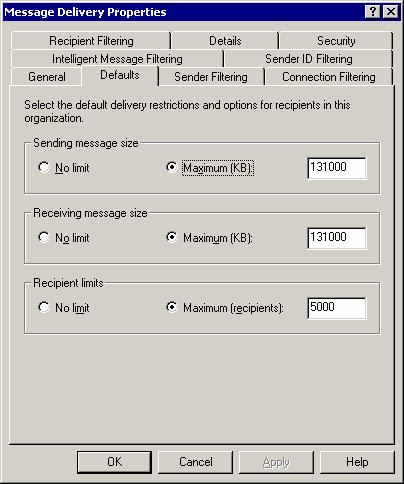
Global SettingThis setting will affect your whole Exchange Organization. The figure below shows that the send/receive message size had been restricted to 131MB for the whole Exchange Organization. This setting will also affect the message size limit of sending and receiving Internet email.


Connector Setting
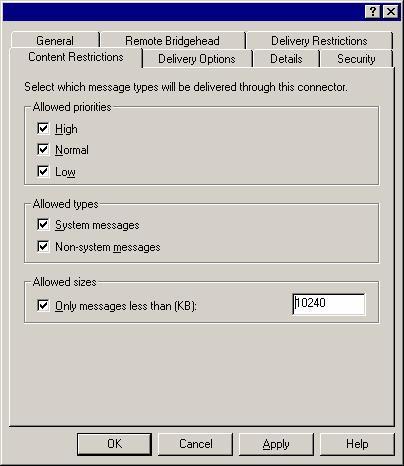
This setting determines the maximum size of the message sending through a connector. Therefore it is use to restrict outgoing message passing through a connector. The figure below shows that message passing through this connector must be less than 10MB.

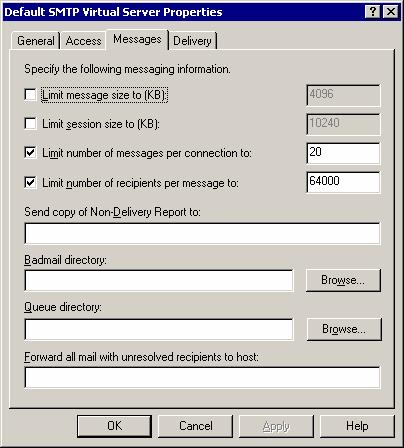
SMTP Virtual Server SettingThis setting determines the maximum size of the message passing through the SMTP Virtual Server. Here are some things to take note of.
  • All incoming messages will be affected by the setting.
  • Outgoing messages sending using MAPI client (e.g. Outlook 2003) will not be affected. I try telnet to the SMTP server and send message large than the configured size, the submission was rejected. However, by using Outlook 2003, the message passes through.
  • Setting the size too small might prevent proper Offline Address Book replication. See "You cannot download the offline address book in Microsoft Outlook in Exchange 2000 Server".

User Mailbox SettingThis setting determines the maximum size of the message which users can send/receive through their mailboxes. The figure below shows that the send/receive message size for the mailbox is set to 8MB.


So with all these settings all over the place, how do we know which will take precedence? According to the article "Exchange 2000 Server and Exchange Server 2003 Message Restrictions" , this is how it works.
  • User Mailbox sending message size configuration overrides Global sending message size configuration.
  • User Mailbox receiving message size configuration takes precedence over Global receiving message size configuration.
  • User Mailbox sending message size configuration does not override Simple Mail Transfer Protocol (SMTP) virtual server limits.
  • User Mailbox sending message size configuration does not override connector defined limits.
Here are some tests and results that I performed.
Test 1
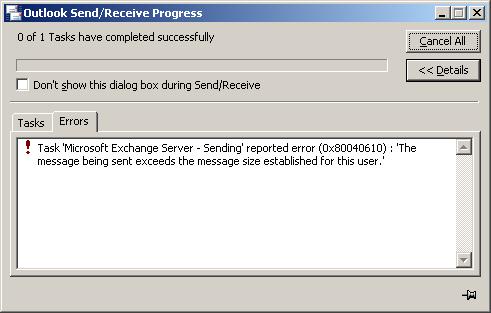
The send/receive message size limit was set to 10MB on the Global setting. No other limit has been set. UserA’s mailbox in Routing Group A and UserB’s mailbox in Routing Group B. UserB tried to send a message that is more than 10MB and receive an Outlook alert dialog box saying the message cannot be send.
If you are using cached mode, you will need to delete away the message otherwise you will keep receiving the alert.


The message was rejected prior to submission which means that the message will not get into the store. If you are using cached mode, your Exchange server and Outlook 2003 must be on Service Pack 2 otherwise, the message will get send out and come back as non-delivery report (NDR).
This simple test shows that the Global setting is working.

Test 2

The send/receive message size limit was set to 10MB on the Global setting. The send/receive message size limit was set 20MB for both UserA and UserB. UserA sent a 14MB message to UserB and the message was delivered to UserB successfully.
Changing the send/receive message size limit on the Global setting to 50MB and the send/receive message size limit for UserB to 10MB. UserA sent a 14MB message to UserB and received an NDR with the following message.
This message is larger than the current system limit or the recipient's mailbox is full. Create a shorter message body or remove attachments and try sending it again.
<e2k3servera.contoso.com>

The NDR was generated by UserA’s Exchange server and the message was not routed to UserB’s and this is really good for the network bandwidth. The NDR also does not include the original message which otherwise will be 14MB instead of just a few KB. This is so because the Exchange server with Service Pack 1 or above will automatically strip off the original message if the size is more than 10MB. If you want to customize the size limit, please see "Option to strip attachments for messages that generate an NDR".
This test shows that the precedence between User Mailbox setting and Global setting is working as stated.

Test 3
This message is larger than the current system limit or the recipient's mailbox is full. Create a shorter message body or remove attachments and try sending it again.
<e2k3serverB.contoso.com #5.2.3 smtp;450 5.2.3 Msg Size greater than allowed by Remote Host>

The NDR was generated by UserB’s Exchange server and the NDR does not contain the original message.
This test shows that message size limit of the User Mailbox or Global setting does not override the SMTP Virtual Server setting.

Well, there are many more scenarios but I don’t think I am able to test all of them.
Before I end this posting, another thing to take note is the MIME conversion which can cause message send across routing group to increase as much as 30%. So this is also something to consider when implementing message size limit.
The send/receive message size limit was set to 80MB on the Global setting. The send/receive message size limit was set 30MB for both UserA and UserB. The limit message size on UserA’s SMTP Virtual Server was set to 20MB. UserA sent a 23MB message to UserB and it was delivered successfully. UserB tried to send a 23MB message to UserA and received an NDR with the following message.

Monday, September 26, 2005

Mailbox Manager Skipping Mailboxes

Last Friday, our Exchange 2003 Mailbox Manager started to skip mailboxes the nightly cleanup. There about 970 mailboxes but only 770 mailboxes got cleanup. Checking the Application Event Log, I saw a lot of Event ID 2037, 2027 and 8231 error logs. This is caused by a missing DLL file for certain address proxy generator. This is probably introduced by a new Exchange 2003 installed in an Exchange 5.5 site in our Exchange Organization.

I wrote an email to our corporate messaging team to require for the missing DLL and received the file the next day. I copied the DLL file to our Exchange server and ran the Mailbox Manager manually. I went out for a few hours and when we came home, I checked on the result of the mailbox cleanup and it is still skipping 200 mailboxes.

I used the reports generated by Mailbox Manager to find out which are the mailboxes being skipped. After getting the list of mailboxes, I used ADSIEdit.msc to check on the properties of those skipped mailboxes. I noticed that the value of the msExchPolicesIncluded property for those mailboxes is incorrect. I ran a vbscript to update the email addresses for all the mailbox-enabled AD accounts. Waited for a few minutes and verified the value of the msExchPolicesIncluded property for those problematic mailboxes had been update correctly.

The Mailbox Manager ran last night and it reported 960 mailboxes being cleanup. Well, I have forgotten to run the vbscript against one of the Organizational Units which contains the AD accounts of the 10 skipped mailboxes last night. I had ran the vbscript to update those 10 AD accounts and their msExchPolicesIncluded property had been updated.